


Da wird ja so einiges auf uns zukommen.
Mal sehen ob wir das alles wieder zum laufen bringen.
Es sind mehr Scripte davon betroffen als ich dachte.
Mal sehen.
Mfg.
Endor
Da wird ja so einiges auf uns zukommen.
Mal sehen ob wir das alles wieder zum laufen bringen.
Es sind mehr Scripte davon betroffen als ich dachte.
Mal sehen.
Mfg.
Endor
Hallo FuchsFan
Teste mal meine Version die funktioniert hier jetzt:
//ScrollTopAndBottom.uc.js


(function() {

	let menuitem = document.createXULElement('menuitem');
	menuitem.id = 'context-to-top';
	menuitem.classList.add('menuitem-iconic');
	menuitem.setAttribute('tooltiptext' , '');
	menuitem.style.setProperty('--menuitem-icon', 'url("chrome://browser/skin/back.svg")');
	//menuitem.style.listStyleImage='url("chrome://browser/skin/back.svg")';
	let refItem = document.getElementById('context-reload');
	refItem.parentNode.insertBefore(menuitem, refItem);
	//click
	menuitem.addEventListener('click', () => {
		if (event.button == 0) {
			ownerGlobal.gBrowser.selectedBrowser.messageManager.loadFrameScript(' data: , content.scrollTo(0,0) ' , false);
		}
	});

})();

(function() {

	let menuitem = document.createXULElement('menuitem');
	menuitem.id = 'context-to-bottom';
	menuitem.classList.add('menuitem-iconic');
	menuitem.setAttribute('tooltiptext' , '');
	menuitem.style.setProperty('--menuitem-icon', 'url("chrome://browser/skin/forward.svg")');
	//menuitem.style.listStyleImage='url("chrome://browser/skin/forward.svg")';
	let refItem = document.getElementById('context-reload');
	refItem.parentNode.insertBefore(menuitem, refItem);
	//click
	menuitem.addEventListener('click', () => {
		if (event.button == 0) {
			ownerGlobal.gBrowser.selectedBrowser.messageManager.loadFrameScript(' data: , content.scrollTo(0,100000) ' , false);
		}
	});

	var css = '\
	@-moz-document url("chrome://browser/content/browser.xhtml") { \
	#context-to-top { \
	--menuitem-icon: url("chrome://browser/skin/back.svg");\
	transform:rotate(90deg)!important;\
	color:#00cd00!important;\
	}\
	#context-to-top:hover { \
	--menuitem-icon: url("chrome://browser/skin/back.svg");\
	transform:rotate(90deg)!important;\
	color:#008b00!important;\
	}\
	\
	#context-to-bottom{\
	--menuitem-icon: url("chrome://browser/skin/forward.svg");\
	transform:rotate(90deg)!important;\
	color:#00cd00!important;\
	}\
	#context-to-bottom:hover{\
	--menuitem-icon: url("chrome://browser/skin/forward.svg");\
	transform:rotate(90deg)!important;\
	color:#008b00!important;\
	}';
	var cssUri = Services.io.newURI('data:text/css,' + encodeURIComponent(css), null, null);
	var SSS = Cc['@mozilla.org/content/style-sheet-service;1'].getService(Ci.nsIStyleSheetService);
	SSS.loadAndRegisterSheet(cssUri, SSS.AGENT_SHEET);
})();So geht es hier.
Mfg.
Endor
Auch beim Script aboutconfig_menu.uc.js werden bei den
Untermenüs nur vier ecke dargestellt.
Mfg.
Endor
Hallo 2002Andreas
Ja ist hier auch so. Eben kontrolliert.
Bei manchen Scripten die Schaltflächen mit Symbolen einfügen
fehlt das Icon, aber nicht bei allen. Komisch?
Mfg.
Endor
Hallo Road-Runner .
Auch von mir alles alles Gute zum Geburtstag.
Vor allem viel Gesundheit wünsche ich Dir.
Mfg.
Endor

security.browser_xhtml_csp.enabled
Genau.
Ich habe hier in about:config die Einstellung für CSP auf false.
Daher läuft es wahrscheinlich bei mir.
Mfg.
Endor
Diese Version funktioniert hier einwandfrei.
// ==UserScript==
// @name           newTabButtonUndoTabList.uc.js
// @description    Bei Rechtsklick auf die Neuen Tab Schaltfläche, wird im Kontextmenü,
// @description    der Eintrag zum Wiederherstellen des zuletzt geschlossenen Tabs angezeigt.
// @include        main
// ==/UserScript==
(function () {

    if (!window.gBrowser){
        return;
    }

    gBrowser.tabContainer.addEventListener('click', function (e) {
        if (e.originalTarget.id != 'tabs-newtab-button') return;
        switch (e.button) {
            case 1:
                undoCloseTab(0);
                break;
            case 2:
                UCT.makePopup(e);
                event.preventDefault();
                break;
        }
    }, false);

})();

var UCT = {
    init: function () {
        var mp = document.createXULElement("menupopup");
        mp.id = "undo-close-tab-list";
        mp.setAttribute("onpopupshowing", "UCT.onpopupshowing(event);");
        mp.setAttribute("placespopup", true);
        mp.setAttribute("tooltip", "bhTooltip");
        mp.setAttribute("popupsinherittooltip", true);
        document?.getElementById("mainPopupSet")?.appendChild(mp);
    },

    makePopup: function (e) {
        if (SessionStore.getClosedTabCountForWindow(window) != 0) {
            document.getElementById("undo-close-tab-list").openPopupAtScreen(e.screenX +2, e.screenY +2, false);
        }
        else
        {
            console.log("--- Es gibt keinen Tab, der wiederhergestellt werden kann ---");
        }
    },

    onpopupshowing: function (e) {
        var popup = e.target;

        while (popup.hasChildNodes())
            popup.removeChild(popup.firstChild);

        let undoItems = SessionStore.getClosedTabDataForWindow(window);
        undoItems.map(function (item, id) {
            var m = document.createXULElement('menuitem');
            m.setAttribute('label', item.title);
            m.setAttribute('image', item.image );
            m.setAttribute('class', 'menuitem-iconic bookmark-item');
            m.setAttribute('oncommand', 'undoCloseTab(' + id + ')');
            popup.appendChild(m);
        });

        popup.appendChild(document.createXULElement("menuseparator"));
        m = document.createXULElement("menuitem");
        m.setAttribute("label", "Chronik in der Sidebar öffnen");
        m.setAttribute("image", "chrome://browser/skin/history.svg");
        m.setAttribute("class", "menuitem-iconic");
        m.setAttribute("oncommand", "SidebarController.toggle('viewHistorySidebar');");
        popup.appendChild(m);
    },

};

setTimeout(function() {
      UCT.init();
},250);Teste mal.
Mfg.
Endor
Testet bitte mal diese Version.
Ist von BenzBrake. jizz
Er ist hier im Forum unter einem anderen Namen tätig.
Habe die von milupo erwähnte Zeile entsprechend geändert.
Das öffnen von geschlossenen Fenstern funktioniert hier damit aber nicht.
Tabs ja.
// ==UserScript==
// @name            UndoCloseTabButtonN
// @description	    Kürzlich geschlossene Tabs, mit Klick auf Schaltfläche in der Navbar oder Mittelklick auf freie Stelle in Tableiste, wiederherstellen.
// @version         1.2.9
// @include         main
// @sandbox         true
// @charset         UTF-8
// @note            2025/07/21 Fx141
// @note            2025/01/31 Fx136 fix Remove Cu.import, per Bug Bug 1881888, Bug 1937080 Block inline event handlers in Nightly and collect telemetry
// @note            2023/08/16 Fx117 fix this is undefined
// @note            2023/06/08 Fx115 SessionStore.getClosedTabData → SessionStore.getClosedTabDataForWindow
// @note            2022/11/12 Verhalten der linken, mittleren und rechten Taste ändern
// @note            2021/12/12 Fx95 SessionStore.getClosedTabData / getClosedWindowData Der Rückgabewert wurde von JSON in Array geändert.
// @note            2019/01/23 Fx66 Problem, bei dem das Klicken in die Tableiste nicht funktionierte - behoben
// @note            2019/07/04 Fx69
// @note            2019/09/03 Fx70
// @note            2019/12/09 Fx72
// ==/UserScript==
// Schaltfläche wird standardmäßig in die Tableiste eingefügt.
(function () {
    "use strict";

    const CONFIG = {
        useTabbarMiddleClick: true, // Enable middle-click on tab bar to restore last closed tab
        XULNS: "http://www.mozilla.org/keymaster/gatekeeper/there.is.only.xul",
        BUTTON_ID: "ucjs-undo-close-tab-button1",
        LOCALE: Services.locale.appLocaleAsBCP47.includes("de"),
        LABELS: {
            closedTab: Services.locale.appLocaleAsBCP47.includes("de") ? "Geschlossene Tabs": "Geschlossene Tabs",
            closedWindow: Services.locale.appLocaleAsBCP47.includes("de") ? "Geschlossenes Fenster" : "Geschlossenes Fenster",
            tooltip: Services.locale.appLocaleAsBCP47.includes("de")
                ? "Geschlossene Tabs anzeigen\nMit der mittleren Maustaste schnell den letzten geschlossenen Tab öffnen"
                : "Geschlossene Tabs\nMit der mittleren Maustaste klicken, um den letzten geschlossenen Tab wiederherzustellen"
        }
    };

    if (typeof undoCloseTab === "undefined") {
        window.undoCloseTab = function (aIndex, sourceWindowSSId) {
            // the window we'll open the tab into
            let targetWindow = window;
            // the window the tab was closed from
            let sourceWindow;
            if (sourceWindowSSId) {
                sourceWindow = SessionStore.getWindowById(sourceWindowSSId);
                if (!sourceWindow) {
                    throw new Error(
                        "sourceWindowSSId argument to undoCloseTab didn't resolve to a window"
                    );
                }
            } else {
                sourceWindow = window;
            }

            // wallpaper patch to prevent an unnecessary blank tab (bug 343895)
            let blankTabToRemove = null;
            if (
                targetWindow.gBrowser.visibleTabs.length == 1 &&
                targetWindow.gBrowser.selectedTab.isEmpty
            ) {
                blankTabToRemove = targetWindow.gBrowser.selectedTab;
            }

            // We are specifically interested in the lastClosedTabCount for the source window.
            // When aIndex is undefined, we restore all the lastClosedTabCount tabs.
            let lastClosedTabCount = SessionStore.getLastClosedTabCount(sourceWindow);
            let tab = null;
            // aIndex is undefined if the function is called without a specific tab to restore.
            let tabsToRemove =
                aIndex !== undefined ? [aIndex] : new Array(lastClosedTabCount).fill(0);
            let tabsRemoved = false;
            for (let index of tabsToRemove) {
                if (SessionStore.getClosedTabCountForWindow(sourceWindow) > index) {
                    tab = SessionStore.undoCloseTab(sourceWindow, index, targetWindow);
                    tabsRemoved = true;
                }
            }

            if (tabsRemoved && blankTabToRemove) {
                targetWindow.gBrowser.removeTab(blankTabToRemove);
            }

            return tab;
        }
    }

    const UndoCloseTabService = {
        prepareMenu (event) {
            const doc = event.view?.document || document;
            const menu = event.originalTarget;
            this.clearMenu(menu);

            // Populate closed tabs
            const tabData = this.getClosedTabData();
            this.addTabMenuItems(doc, menu, tabData);

            // Populate closed windows
            const windowData = this.getClosedWindowData();
            if (windowData.length > 0) {
                if (tabData.length > 0) {
                    menu.appendChild(this.createElement(doc, "menuseparator"));
                }
                menu.appendChild(this.createElement(doc, "menuitem", {
                    disabled: true,
                    label: CONFIG.LABELS.closedWindow
                }));
                this.addWindowMenuItems(doc, menu, windowData);
            }

            if (tabData.length + windowData.length === 0) {
                event.preventDefault();
            }
        },

        getClosedTabData () {
            let data = "getClosedTabDataForWindow" in SessionStore
                ? SessionStore.getClosedTabDataForWindow(window)
                : SessionStore.getClosedTabData(window);
            return typeof data === "string" ? JSON.parse(data) : data;
        },

        getClosedWindowData () {
            let data = SessionStore.getClosedWindowData(window);
            return typeof data === "string" ? JSON.parse(data) : data;
        },

        addTabMenuItems (doc, menu, data) {
            data.forEach((item, index) => {
                const menuItem = this.createFaviconMenuitem(doc, item.title, item.image, index, this.undoTab);
                const state = item.state;
                let idx = state.index;
                if (idx === 0) idx = state.entries.length;
                if (--idx >= 0 && state.entries[idx]) {
                    menuItem.setAttribute("targetURI", state.entries[idx].url);
                }
                menu.appendChild(menuItem);
            });
        },

        addWindowMenuItems (doc, menu, data) {
            data.forEach((item, index) => {
                let title = item.title;
                const tabsCount = item.tabs.length - 1;
                if (tabsCount > 0) title += ` (总计:${tabsCount})`;
                const tab = item.tabs[item.selected - 1];
                menu.appendChild(this.createFaviconMenuitem(doc, title, tab.image, index, this.undoWindow));
            });
        },

        createFaviconMenuitem (doc, label, icon, value, command) {
            const attrs = {
                class: "menuitem-iconic bookmark-item menuitem-with-favicon",
                label,
                value
            };
            if (icon) {
                attrs.image = /^https?:/.test(icon) ? `moz-anno:favicon:${icon}` : icon;
            }
            const menuItem = this.createElement(doc, "menuitem", attrs);
            menuItem.addEventListener("command", command, false);
            return menuItem;
        },

        undoTab (event) {
            undoCloseTab(event.originalTarget.getAttribute("value"));
        },

        undoWindow (event) {
            undoCloseWindow(event.originalTarget.getAttribute("value"));
        },

        clearMenu (element) {
            const range = document.createRange();
            range.selectNodeContents(element);
            range.deleteContents();
        },

        onClick (event) {
            if (event.button === 0 && event.target.id === CONFIG.BUTTON_ID) {
                event.preventDefault();
                event.stopPropagation();
                undoCloseTab();
            } else if (event.button === 1 && ["box", "scrollbox"].includes(event.originalTarget.localName)) {
                event.preventDefault();
                event.stopPropagation();
                undoCloseTab();
            } else if (event.button === 2 && event.target.id === CONFIG.BUTTON_ID) {
                event.preventDefault();
                event.stopPropagation();
                const pos = (event.target.ownerGlobal.innerWidth / 2) > event.pageX
                    ? { position: "after_position", x: 0, y: event.target.clientHeight }
                    : { position: "after_end", x: 0, y: 0 };
                event.target.querySelector("menupopup").openPopup(event.target, pos.position, pos.x, pos.y);
            }
        },

        createElement (doc, tag, attrs = {}) {
            const element = doc.createElementNS(CONFIG.XULNS, tag);
            Object.entries(attrs).forEach(([key, value]) => {
                if (key.startsWith('on') && typeof value === 'function') {
                    element.addEventListener(key.slice(2).toLowerCase(), value, false);
                } else {
                    element.setAttribute(key, value);
                }
            });
            return element;
        }
    };

    function initialize () {
        if (CONFIG.useTabbarMiddleClick) {
            gBrowser.tabContainer.addEventListener("click", UndoCloseTabService.onClick, true);
        }

        if (document.getElementById(CONFIG.BUTTON_ID)) return;

        try {
            const CustomizableUI = globalThis.CustomizableUI || ChromeUtils.importESModule("resource:///modules/CustomizableUI.sys.mjs");
            CustomizableUI.createWidget({
                id: CONFIG.BUTTON_ID,
                defaultArea: CustomizableUI.AREA_NAVBAR,
                type: "custom",
                onBuild: doc => {
                    const button = UndoCloseTabService.createElement(doc, "toolbarbutton", {
                        id: CONFIG.BUTTON_ID,
                        class: "toolbarbutton-1 chromeclass-toolbar-additional",
                        type: "contextmenu",
                        anchor: "dropmarker",
                        label: CONFIG.LABELS.closedTab,
                        tooltiptext: CONFIG.LABELS.tooltip,
                        image: "data:image/png;base64,iVBORw0KGgoAAAANSUhEUgAAABAAAAAQCAYAAAAf8/9hAAAACXBIWXMAAAsTAAALEwEAmpwYAAAABGdBTUEAALGOfPtRkwAAACBjSFJNAAB6JQAAgIMAAPn/AACA6QAAdTAAAOpgAAA6mAAAF2+SX8VGAAADgUlEQVR42mL8//8/AyUAIIBYYIzVq1dLC4mIrvr08ZPV379/vjEzMwOZnycmxMV04DMAIIAYQC4A4dXr1oU+fvLk/5/fv/9//fzl/9ev3/6vWLnqK0weFwYIIBZ0A79//crw5+9fhh+//jBYWlhz1dc3fgIqZeDh4WHk4uaqysnKmoysHiCAwAbceHRD6uLdQ0kGunoMv9hYGX79/sPw7cdvhn///jNYWJjzgtRw8/AwvHz5smzutlbN4yeP/k8Pqeo11bW5BxBAjCBnFPbHd7EIMJRoiZgx8nBwMvz+85fhJ9CQf3//Mzx9+pQBFM483FwMQG8xMDL/ZXj46cZ/9v/sk6ZWriwACCCwC25eviprEKbGeOP/AYavb34wsHCwMPz9AzTg9z+GP7x/Gf7++ws07B/Djz+/GZiYGBhYBdgYrx68JwXUyggQQGADePgFfjD+ZGHgF+Bl+P7yHZDPycDGws2gKW7GIMAhwnDs4XaGJ1/uMPz+8Z2BnYOZ4fOnzwwsrMxfgVr/AwQQ2ABpGYkv/GLcDELSfEDn/2HgFeZh8JdLYfjw6SODvqw5g4KiPMOsMw0MDEDbOYWABrz5zsAtI/wJpBcggJhABD+P8MefX38x/AU6k+EvIwPHHx4GNgYuhuuPLzCcuL2f4QswZozEHBjYGDmAdjIw/Pn+l0FCVOoNSC9AAIENEBEQe/Pjy0+GP8CA42LgZ/BXTWb48OUdw6m7+xmm7W5hePTqLoOLaigD+28+hnfv3jN8ePMJaIDMc5BegAACGyApLPX82+fvDB/ev2f4/eU/Ax+bEMOLd08ZpITkGbTl9IHp4jfDsev7GL59/8Lw+9dvhp/ffjPISio+BekFCCCwAQpiyrdfPn3F8OrVa4bHr+8zXHxwioGbjY+hwq+PwVkzmCHYMpFBS84A6Pp/DP/+/2P4+/Mvg5Ks+gOQXoAAggSimNqTb59+/v7x7SfL289vGRccmMDAxyrEsO3sKmCC+sKw9+xmhicf7gLxfQZ2QSaG/38YfkvyyoPCgBEggMAGfPnyhV2eV6vzxs7LWr9//Gf+yPKS6f/fl8zAhMgISkX//11h+M/I+A/ohL/f2P7/1VA2uvb161cOkAMAAogRmp1Znz17xsrCwsL07ds3lu/fvzOD2D9+/GCCpXk2Nra/XFxc/4Bif7i5uf9ISUn9Bgr/BggwAMhljD12v/akAAAAAElFTkSuQmCC",
                        onclick: UndoCloseTabService.onClick
                    });
                    const menu = UndoCloseTabService.createElement(doc, "menupopup", {
                        tooltip: "bhTooltip",
                        popupsinherittooltip: "true",
                        oncontextmenu: event => event.preventDefault(),
                        onpopupshowing: event => UndoCloseTabService.prepareMenu(event)
                    });
                    button.appendChild(menu);
                    return button;
                }
            });
        } catch (e) {
            console.error("Failed to create widget:", e);
        }
    }

    if (gBrowserInit.delayedStartupFinished) {
        initialize();
    } else {
        const observer = (subject, topic) => {
            if (topic === "browser-delayed-startup-finished" && subject === window) {
                Services.obs.removeObserver(observer, topic);
                initialize();
            }
        };
        Services.obs.addObserver(observer, "browser-delayed-startup-finished");
    }
})();Teste mal die von benzBrake:
Mfg.
Endor

Nightly macht es auch "richtig" bei Texteingabefeldern.
Habe ich gerade mal getestet. Nightly von heute, selbes Verhalten.
Leider.
teste das mal damit sieht es brauchbar aus
menupopup[needsgutter] {
  @media (-moz-platform: linux) or (-moz-platform: windows) {
    & > :is(menu, menuitem) > .menu-icon {
      display: none !important;
    }
  }
}
Nur bei den Erweiterungen hapert es noch.
Mira_Belle
Mein ganzes CSS für Kontextmenü Symbole sind fast 6000 Zeilen.
Willst Du Dir die wirklich im ernst antun?
Hier mal ein ausschnitt davon:
#tabContextUndoList > menupopup:nth-child(4) > menuitem:nth-child(1),
	#ContextUndoList > menupopup:nth-child(4) > menuitem:nth-child(1){
	appearance: none !important;
	background: url("data:image/png;base64,iVBORw0KGgoAAAANSUhEUgAAABAAAAAQCAYAAAAf8/9hAAABeElEQVQ4jX2SP0vDUBTFT0oWU1sdVLAUsdIOXRIQaVEcnArN1s0xxU/i1K/gppsKAae+UruIVIfikLxV0EFFKBSR9B8meB2kr0mb9MAb8s67597fe5EYY4RoXei6Xl3gA4wxCpNt29Rut4kxdr6oPhZlKIqCQqGAZDJpmKYZGSIxxqhcLgMA3h6v8dS8QuX0Bo1GY1FjgSb7d4cfD9jYVMT3JNgvzjkcxzEYY9B1vSoC+oMRvPU9pLbi6A9Gka0VRUE+n0en0zFM05xOcHZ5i8/hKtxfQHu9Q2plWuRH6/V6AIBEIgHLsgxxiZn0GrqjGLrfP8jtpANd/WjFYhHZbBaqqsJxnOkEldI+KqVpUbP5Hoq2HF8KhIuAe+sllHkW7eQ4eLEy0f+PeKhuB4xW61mg2fYX3PEYuYMMJuclSQpOIMuBFxWaRZsL4JyDcz5XqGnaQrSj3WzovlC9XiciItd155bneUREVKvVKHxun6LQhB9lRKHN6g+C+M39afVRcgAAAABJRU5ErkJggg==") no-repeat !important;
	min-height: 24px!important;
	padding-left:36px!important;
	background-position:13px 9px!important;}

	#tabContextUndoList > menupopup:nth-child(4) > menuitem:nth-child(1):hover,
	#ContextUndoList > menupopup:nth-child(4) > menuitem:nth-child(1):hover{
	appearance: none !important;
	background: #ecf0f6 url("data:image/png;base64,iVBORw0KGgoAAAANSUhEUgAAABAAAAAQCAYAAAAf8/9hAAABeElEQVQ4jX2SP0vDUBTFT0oWU1sdVLAUsdIOXRIQaVEcnArN1s0xxU/i1K/gppsKAae+UruIVIfikLxV0EFFKBSR9B8meB2kr0mb9MAb8s67597fe5EYY4RoXei6Xl3gA4wxCpNt29Rut4kxdr6oPhZlKIqCQqGAZDJpmKYZGSIxxqhcLgMA3h6v8dS8QuX0Bo1GY1FjgSb7d4cfD9jYVMT3JNgvzjkcxzEYY9B1vSoC+oMRvPU9pLbi6A9Gka0VRUE+n0en0zFM05xOcHZ5i8/hKtxfQHu9Q2plWuRH6/V6AIBEIgHLsgxxiZn0GrqjGLrfP8jtpANd/WjFYhHZbBaqqsJxnOkEldI+KqVpUbP5Hoq2HF8KhIuAe+sllHkW7eQ4eLEy0f+PeKhuB4xW61mg2fYX3PEYuYMMJuclSQpOIMuBFxWaRZsL4JyDcz5XqGnaQrSj3WzovlC9XiciItd155bneUREVKvVKHxun6LQhB9lRKHN6g+C+M39afVRcgAAAABJRU5ErkJggg==") no-repeat !important;
	min-height: 24px!important;
	padding-left:36px!important;
	background-position:13px 9px!important;}

	#context_moveTabToNewGroup{
	appearance: none !important;
	background: url("data:image/png;base64,iVBORw0KGgoAAAANSUhEUgAAABAAAAAQCAYAAAAf8/9hAAABeElEQVQ4jX2SP0vDUBTFT0oWU1sdVLAUsdIOXRIQaVEcnArN1s0xxU/i1K/gppsKAae+UruIVIfikLxV0EFFKBSR9B8meB2kr0mb9MAb8s67597fe5EYY4RoXei6Xl3gA4wxCpNt29Rut4kxdr6oPhZlKIqCQqGAZDJpmKYZGSIxxqhcLgMA3h6v8dS8QuX0Bo1GY1FjgSb7d4cfD9jYVMT3JNgvzjkcxzEYY9B1vSoC+oMRvPU9pLbi6A9Gka0VRUE+n0en0zFM05xOcHZ5i8/hKtxfQHu9Q2plWuRH6/V6AIBEIgHLsgxxiZn0GrqjGLrfP8jtpANd/WjFYhHZbBaqqsJxnOkEldI+KqVpUbP5Hoq2HF8KhIuAe+sllHkW7eQ4eLEy0f+PeKhuB4xW61mg2fYX3PEYuYMMJuclSQpOIMuBFxWaRZsL4JyDcz5XqGnaQrSj3WzovlC9XiciItd155bneUREVKvVKHxun6LQhB9lRKHN6g+C+M39afVRcgAAAABJRU5ErkJggg==") no-repeat !important;
	min-height: 24px!important;
	padding-left:28px!important;
	background-position:7px 9px!important;}

	#context_moveTabToNewGroup:hover{
	appearance: none !important;
	background: #ecf0f6 url("data:image/png;base64,iVBORw0KGgoAAAANSUhEUgAAABAAAAAQCAYAAAAf8/9hAAABeElEQVQ4jX2SP0vDUBTFT0oWU1sdVLAUsdIOXRIQaVEcnArN1s0xxU/i1K/gppsKAae+UruIVIfikLxV0EFFKBSR9B8meB2kr0mb9MAb8s67597fe5EYY4RoXei6Xl3gA4wxCpNt29Rut4kxdr6oPhZlKIqCQqGAZDJpmKYZGSIxxqhcLgMA3h6v8dS8QuX0Bo1GY1FjgSb7d4cfD9jYVMT3JNgvzjkcxzEYY9B1vSoC+oMRvPU9pLbi6A9Gka0VRUE+n0en0zFM05xOcHZ5i8/hKtxfQHu9Q2plWuRH6/V6AIBEIgHLsgxxiZn0GrqjGLrfP8jtpANd/WjFYhHZbBaqqsJxnOkEldI+KqVpUbP5Hoq2HF8KhIuAe+sllHkW7eQ4eLEy0f+PeKhuB4xW61mg2fYX3PEYuYMMJuclSQpOIMuBFxWaRZsL4JyDcz5XqGnaQrSj3WzovlC9XiciItd155bneUREVKvVKHxun6LQhB9lRKHN6g+C+M39afVRcgAAAABJRU5ErkJggg==") no-repeat !important;
	min-height: 24px!important;
	padding-left:28px!important;
	background-position:7px 9px!important;}

	menuitem[label="Kopieren"]{
	appearance: none !important;
	background: url("data:image/png;base64,iVBORw0KGgoAAAANSUhEUgAAABAAAAAQCAYAAAAf8/9hAAABeElEQVQ4jX2SP0vDUBTFT0oWU1sdVLAUsdIOXRIQaVEcnArN1s0xxU/i1K/gppsKAae+UruIVIfikLxV0EFFKBSR9B8meB2kr0mb9MAb8s67597fe5EYY4RoXei6Xl3gA4wxCpNt29Rut4kxdr6oPhZlKIqCQqGAZDJpmKYZGSIxxqhcLgMA3h6v8dS8QuX0Bo1GY1FjgSb7d4cfD9jYVMT3JNgvzjkcxzEYY9B1vSoC+oMRvPU9pLbi6A9Gka0VRUE+n0en0zFM05xOcHZ5i8/hKtxfQHu9Q2plWuRH6/V6AIBEIgHLsgxxiZn0GrqjGLrfP8jtpANd/WjFYhHZbBaqqsJxnOkEldI+KqVpUbP5Hoq2HF8KhIuAe+sllHkW7eQ4eLEy0f+PeKhuB4xW61mg2fYX3PEYuYMMJuclSQpOIMuBFxWaRZsL4JyDcz5XqGnaQrSj3WzovlC9XiciItd155bneUREVKvVKHxun6LQhB9lRKHN6g+C+M39afVRcgAAAABJRU5ErkJggg==") no-repeat !important;
	min-height: 24px!important;
	padding-left:28px!important;
	background-position:7px 9px!important;}

	menuitem[label="Kopieren"]:hover{
	appearance: none !important;
	background: #ecf0f6 url("data:image/png;base64,iVBORw0KGgoAAAANSUhEUgAAABAAAAAQCAYAAAAf8/9hAAABeElEQVQ4jX2SP0vDUBTFT0oWU1sdVLAUsdIOXRIQaVEcnArN1s0xxU/i1K/gppsKAae+UruIVIfikLxV0EFFKBSR9B8meB2kr0mb9MAb8s67597fe5EYY4RoXei6Xl3gA4wxCpNt29Rut4kxdr6oPhZlKIqCQqGAZDJpmKYZGSIxxqhcLgMA3h6v8dS8QuX0Bo1GY1FjgSb7d4cfD9jYVMT3JNgvzjkcxzEYY9B1vSoC+oMRvPU9pLbi6A9Gka0VRUE+n0en0zFM05xOcHZ5i8/hKtxfQHu9Q2plWuRH6/V6AIBEIgHLsgxxiZn0GrqjGLrfP8jtpANd/WjFYhHZbBaqqsJxnOkEldI+KqVpUbP5Hoq2HF8KhIuAe+sllHkW7eQ4eLEy0f+PeKhuB4xW61mg2fYX3PEYuYMMJuclSQpOIMuBFxWaRZsL4JyDcz5XqGnaQrSj3WzovlC9XiciItd155bneUREVKvVKHxun6LQhB9lRKHN6g+C+M39afVRcgAAAABJRU5ErkJggg==") no-repeat !important;
	min-height: 24px!important;
	padding-left:28px!important;
	background-position:7px 9px!important;}

	menuitem[label="Einfügen"]{
	appearance: none !important;
	background: url("data:image/png;base64,iVBORw0KGgoAAAANSUhEUgAAABAAAAAQCAYAAAAf8/9hAAABnElEQVQ4jYWSz0sbQRTHP8rGH5fUmweRIk0o9NQEjKBCI0RK8if0kEY8FKR49BToJRgwXnPJRSH/gYUJ9KTH5LDirZR4UUqlh6U0qW7c3XkeYrYbdc0XhnnDm/eZ77yZMQIqlUoSXBeLxTFGyPhaSvhF1/E4yWQSANM0+ZyZkffpBaw/mo/7Z0/CDICVfBWA/NYu9XrdT64n3rL84QvV4na4g0Hwu/2NnfxrLi9+0vnb5bp7wz/rChDsnowG9Dq/eDEhTMwZWG+2/A3N7zarm3uoTQaUw1wutzEMEEFEA5qpyQgA2Wx26KRGo0Emk6HVahWUUgwg4wCCgHigdX8OUSQSIZVKEY1GC0qpgyEHaA/QIDoU0Gw2/di27QKwcQ/QoF3kAeDYbPvx9Gycm/s4vRSjUqkEeoBGtNMvDgDSyVioG8/zAgDRoG8RkaEeBB0EFQQb/XrN/OLg6YSrH33Iu8SrUAc+wHGEo4Mqvdv/n+Xl2icATk7PRzp4UkopERFxHOfRcF1XRETK5bL4Vwi1Zzyb5llArVbDsqyRgDvukMUKcpWeDwAAAABJRU5ErkJggg==") no-repeat !important;
	min-height: 24px!important;
	padding-left:28px!important;
	background-position:7px 9px!important;}

	menuitem[label="Einfügen"]:hover{
	appearance: none !important;
 	background: #ecf0f6 url("data:image/png;base64,iVBORw0KGgoAAAANSUhEUgAAABAAAAAQCAYAAAAf8/9hAAABnElEQVQ4jYWSz0sbQRTHP8rGH5fUmweRIk0o9NQEjKBCI0RK8if0kEY8FKR49BToJRgwXnPJRSH/gYUJ9KTH5LDirZR4UUqlh6U0qW7c3XkeYrYbdc0XhnnDm/eZ77yZMQIqlUoSXBeLxTFGyPhaSvhF1/E4yWQSANM0+ZyZkffpBaw/mo/7Z0/CDICVfBWA/NYu9XrdT64n3rL84QvV4na4g0Hwu/2NnfxrLi9+0vnb5bp7wz/rChDsnowG9Dq/eDEhTMwZWG+2/A3N7zarm3uoTQaUw1wutzEMEEFEA5qpyQgA2Wx26KRGo0Emk6HVahWUUgwg4wCCgHigdX8OUSQSIZVKEY1GC0qpgyEHaA/QIDoU0Gw2/di27QKwcQ/QoF3kAeDYbPvx9Gycm/s4vRSjUqkEeoBGtNMvDgDSyVioG8/zAgDRoG8RkaEeBB0EFQQb/XrN/OLg6YSrH33Iu8SrUAc+wHGEo4Mqvdv/n+Xl2icATk7PRzp4UkopERFxHOfRcF1XRETK5bL4Vwi1Zzyb5llArVbDsqyRgDvukMUKcpWeDwAAAABJRU5ErkJggg==") no-repeat !important;
	min-height: 24px!important;
	padding-left:28px!important;
background-position:7px 9px!important;}Für das Forum zum testen Bilder als Base64
hier sonst als link zbs. "..//icons/Tabs.png" in Verwendung.
Mfg.
Endor
Horstmann
Bin mir nicht sicher ob das ein Bug ist.
Es verhält sich aber auch ohne CSS Codes usw. so.

Ich habe hier alle Einträge einzeln angepasst.
Ja das möchte ich ja auch bloß wie, ohne dass es anderswo Auswirkungen hat.
Mfg.
Endor
Hallo 2002Andreas
Mit Deinem obigen CSS Code sieht es schon besser aus.
Aber er spricht nicht alle Einträge an.
Alle die von Scripten eingefügt werden zbs. aber auch andere.
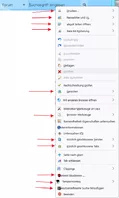
Trotzdem vielen Dank für Deine Mühe.
Mfg.
Endor
Hallo zusammen.
In Firefox 141 beta da sind fast überall die Abstände im Kontextmenü
bei den Symbolen zum Text wieder richtig im Vergleich zu Firefox 140.
Es gibt eine Ausnahme: Wenn man in ein Textfeld einen Rechtsklick
macht, im Kontextmenü die Rechtschreibprüfung aktiviert, dann mit
Rechtsklick das Menü noch mal öffnet dann sind die zwischen den Einträge
mehr Abstand und links zwischen den Symbolen und Text ist auch
mehr Abstand . Wie kann man mit CSS den Abstand zwischen Text
und Symbol nur in diesem Menü verringern?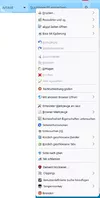
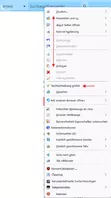
Linkes Bild so ist es normal, rechtes Bild bei aktivierter Rechtschreibprüfung.
Rechtschreibprüfung Eintrag wird nur bei installiertem Wörterbuch angezeigt.
Mfg.
Endor
Dann kann ich Dir leider nicht weiter helfen.
Hier lokal habe ich diesen Parameter für mich eingebaut.
Brauche ich öfters. Finde ich recht praktisch.
Mfg.
Endor
Hallo 2002Andreas.
Es gibt eine neuere Version von diesem Script:
// ==UserScript==
// @name dav_LinkifiesLocationBar
// @version 1.1
// @description dav_LinkifiesLocationBar
// @shutdown dav_LinkifiesLocationBar.globalShutdown();
// ==/UserScript==
/*
Idea based on
https://addons.mozilla.org/en-US/firefox/addon/locationbar%C2%B2/
https://github.com/simonlindholm/locationbar2
*/
setTimeout(function() {
if (location.href != 'chrome://browser/content/browser.xhtml') return;
//You must set be set to false the preference browser.tabs.hoverPreview.enabled
const colorizeExtensionFile = false,
selectUrlbarText = true,
pathnameArrow = true,
fontMonospace = true,
usePunycode = true;
//https://stackoverflow.com/questions/183485/converting-punycode-with-dash-character-to-unicode/301287#301287
var punycode=new function(){this.utf16={decode:function(r){for(var o,e,t=[],n=0,f=r.length;n<f;){if(55296==(63488&(o=r.charCodeAt(n++)))){if(e=r.charCodeAt(n++),55296!=(64512&o)||56320!=(64512&e))throw new RangeError("UTF-16(decode): Illegal UTF-16 sequence");o=((1023&o)<<10)+(1023&e)+65536}t.push(o)}return t},encode:function(r){for(var o,e=[],t=0,n=r.length;t<n;){if(55296==(63488&(o=r[t++])))throw new RangeError("UTF-16(encode): Illegal UTF-16 value");o>65535&&(o-=65536,e.push(String.fromCharCode(o>>>10&1023|55296)),o=56320|1023&o),e.push(String.fromCharCode(o))}return e.join("")}};var r=36,o=700,e=1,t=26,n=38,f=2147483647;function h(r,o){return r+22+75*(r<26)-((0!=o)<<5)}function a(f,h,a){var i;for(f=a?Math.floor(f/o):f>>1,f+=Math.floor(f/h),i=0;f>(r-e)*t>>1;i+=r)f=Math.floor(f/(r-e));return Math.floor(i+(r-e+1)*f/(f+n))}this.decode=function(o,n){var h,i,u,c,d,l,p,g,s,C,v,w,y,A,E=[],M=[],R=o.length;for(h=128,u=0,c=72,(d=o.lastIndexOf("-"))<0&&(d=0),l=0;l<d;++l){if(n&&(M[E.length]=o.charCodeAt(l)-65<26),o.charCodeAt(l)>=128)throw new RangeError("Illegal input >= 0x80");E.push(o.charCodeAt(l))}for(p=d>0?d+1:0;p<R;){for(g=u,s=1,C=r;;C+=r){if(p>=R)throw RangeError("punycode_bad_input(1)");if((v=(A=o.charCodeAt(p++))-48<10?A-22:A-65<26?A-65:A-97<26?A-97:r)>=r)throw RangeError("punycode_bad_input(2)");if(v>Math.floor((f-u)/s))throw RangeError("punycode_overflow(1)");if(u+=v*s,v<(w=C<=c?e:C>=c+t?t:C-c))break;if(s>Math.floor(f/(r-w)))throw RangeError("punycode_overflow(2)");s*=r-w}if(c=a(u-g,i=E.length+1,0===g),Math.floor(u/i)>f-h)throw RangeError("punycode_overflow(3)");h+=Math.floor(u/i),u%=i,n&&M.splice(u,0,o.charCodeAt(p-1)-65<26),E.splice(u,0,h),u++}if(n)for(u=0,y=E.length;u<y;u++)M[u]&&(E[u]=String.fromCharCode(E[u]).toUpperCase().charCodeAt(0));return this.utf16.encode(E)},this.encode=function(o,n){var i,u,c,d,l,p,g,s,C,v,w,y;n&&(y=this.utf16.decode(o));var A=(o=this.utf16.decode(o.toLowerCase())).length;if(n)for(p=0;p<A;p++)y[p]=o[p]!=y[p];var E,M,R=[];for(i=128,u=0,l=72,p=0;p<A;++p)o[p]<128&&R.push(String.fromCharCode(y?(E=o[p],M=y[p],(E-=(E-97<26)<<5)+((!M&&E-65<26)<<5)):o[p]));for(c=d=R.length,d>0&&R.push("-");c<A;){for(g=f,p=0;p<A;++p)(w=o[p])>=i&&w<g&&(g=w);if(g-i>Math.floor((f-u)/(c+1)))throw RangeError("punycode_overflow (1)");for(u+=(g-i)*(c+1),i=g,p=0;p<A;++p){if((w=o[p])<i&&++u>f)return Error("punycode_overflow(2)");if(w==i){for(s=u,C=r;!(s<(v=C<=l?e:C>=l+t?t:C-l));C+=r)R.push(String.fromCharCode(h(v+(s-v)%(r-v),0))),s=Math.floor((s-v)/(r-v));R.push(String.fromCharCode(h(s,n&&y[p]?1:0))),l=a(u,c+1,c==d),u=0,++c}}++u,++i}return R.join("")},this.ToASCII=function(r){for(var o=r.split("."),e=[],t=0;t<o.length;++t){var n=o[t];e.push(n.match(/[^A-Za-z0-9-]/)?"xn--"+punycode.encode(n):n)}return e.join(".")},this.toUnicode=function(r){for(var o=r.split("."),e=[],t=0;t<o.length;++t){var n=o[t];e.push(n.match(/^xn--/)?punycode.decode(n.slice(4)):n)}return e.join(".")}};
function getWindow(){
return window;
}
function getMostRecentWindow(){
var win = Components.classes["@mozilla.org/appshell/window-mediator;1"]
.getService(Components.interfaces.nsIWindowMediator)
.getMostRecentWindow("navigator:browser");
return win;
}
var localWindow = getWindow();
localWindow.dav_LinkifiesLocationBar = {};
var styleBase = `
@namespace url("http://www.mozilla.org/keymaster/gatekeeper/there.is.only.xul");
.claseLocationBar{
display: block;
position: absolute;
height: 24px;
width: 100%;
line-height: 24px;
white-space:nowrap;
overflow:hidden;
}
.claseLocationBar span{
position: relative;
margin: 0 1px;
display: inline-block;
}
.claseLocationBar span:hover{
text-decoration: underline;
cursor: pointer;
}
.claseLocationBar .label_pathname {
margin-inline: unset !important;
}
locationBarTag{
display: inline;
}
/*************************************
*************** COLORS ***************
*************************************/
.claseLocationBar span.protocol{
font-weight: normal;
color: #777777;
margin-right: -1px;
}
.claseLocationBar .subdomain {
font-weight: bold;
color: #C68007;
}
.claseLocationBar span.hostname{
font-weight: bold;
color: red;
}
.claseLocationBar span.port{
color: #5F58A3;
}
.claseLocationBar span.pathname{
color: black;
}
.claseLocationBar span.hash{
color: #1054C9;
margin-left: -1px;
}
.claseLocationBar span.search{
color: #03AA03;
margin-left: -1px;
}
.claseLocationBar .extension{
color: rgb(96,86,143);
}
`;
var style_fontMonospace = !fontMonospace?"":`
@namespace url("http://www.mozilla.org/keymaster/gatekeeper/there.is.only.xul");
.urlbar-input-box[dav_LinkifiesLocationBar]{
font-family: monospace ;
margin-top: 4px;
}
.claseLocationBar{
margin-top: -4px;
line-height: 28px;
}
.claseLocationBar .pathname:after{
top: 10px;
}
.claseLocationBar span.port{
margin-left: -1px;
}
.claseLocationBar .subdomain {
margin-right: -1px;
}
.claseLocationBar span.hostname{
margin-right: 1px;
}
`;
var style_pathnameArrow = !pathnameArrow?"":`
@namespace url("http://www.mozilla.org/keymaster/gatekeeper/there.is.only.xul");
.claseLocationBar span.pathname{
padding-left:9px;
margin: 0 2px;
}
.claseLocationBar .pathname:before{
content:' ';
display: block;
position: absolute;
border-style: solid;
border-width: 4px 4px 4px 7px;
border-color: transparent transparent transparent #6fa880;
border-color: transparent transparent transparent #5ba8bf;
top: 10px;
left: 0px;
}
.claseLocationBar .label_pathname{
display: none;
}
`;
var stylexul = `
.urlbar-input-box[dav_LinkifiesLocationBar] #urlbar-input:focus ~ .claseLocationBar{
display: none !important;
}
.urlbar-input-box[dav_LinkifiesLocationBar] #urlbar-input:focus{
opacity: 1;
}
.urlbar-input-box[dav_LinkifiesLocationBar] #urlbar-input{
opacity: 0;
}
`;
/*
AGENT_SHEET: 0
USER_SHEET: 1
AUTHOR_SHEET: 2
*/
var CSS_Loader = {
sss: Components.classes["@mozilla.org/content/style-sheet-service;1"].getService(Components.interfaces.nsIStyleSheetService),
load: function(cssCode) {
this.unload(cssCode);
var uri = Services.io.newURI("data:text/css;charset=utf-8," + encodeURIComponent(cssCode), null, null);
this.sss.loadAndRegisterSheet(uri, this.sss.AGENT_SHEET);
},
unload: function(cssCode) {
var uri = Services.io.newURI("data:text/css;charset=utf-8," + encodeURIComponent(cssCode), null, null);
if (this.sss.sheetRegistered(uri,this.sss.AGENT_SHEET))
{
this.sss.unregisterSheet(uri,this.sss.AGENT_SHEET);
}
}
}
const CLIKS = {
left: 0,
middle: 1,
right: 2
}
function extend() {
var copy, target = {};
for (var i = 0, l = arguments.length; i < l; i++) {
var options = arguments[i];
for (var name in options) {
copy = options[name];
if (copy !== undefined) {
target[name] = copy;
}
}
}
return target;
}
var styleString = (style) => {
return Object.keys(style).reduce((prev, curr) => {
return `${prev += curr.split(/(?=[A-Z])/).join('-').toLowerCase()}:${style[curr]};`
}, '');
};
function createElement(elto) {
elto = extend({
attrArray: {},
evtListener: [],
estilos: {}
}, elto);
var node = getWindow().document.createXULElement(elto.type);
Object.keys(elto.attrArray).forEach(key => {
if(key == "innerHTML"){
node.innerHTML = encodeHTML(elto.attrArray[key]);
}
else {
node.setAttribute(key, elto.attrArray[key]);
}
});
elto.evtListener.forEach(evt => {
node.addEventListener(evt.type, evt.funcion, false);
});
let estilo = styleString(elto.estilos);
if (estilo) {
node.setAttribute("style", estilo);
}
return node;
}
function encodeHTML(text) {
return decodeURI(text)
.replace(/&/g, '&')
.replace(/</g, '<')
.replace(/>/g, '>')
.replace(/"/g, '"')
.replace(/'/g, ''');
}
function appendPart(text, clase) {
if (!text) return;
if(clase == "pathname")
{
let sp = createElement({
type: "label",
attrArray: {
class: "label_pathname",
innerHTML:"/"
}
});
divLocationBar.appendChild(sp);
}
let sp = createElement({
type: "span",
attrArray: {
class: clase,
innerHTML:text
},
evtListener: [{
type: "click",
funcion: clickPart
}]
});
divLocationBar.appendChild(sp);
sp.setAttribute("href", divLocationBar.textContent);
return sp;
}
function clickPart(evt) {
if (evt.button == CLIKS.right) return;
let target = evt.target;
if (target.className != "protocol") {
let href = target.getAttribute("href");
var where = evt.button == CLIKS.middle || evt.ctrlKey ? "tab" : "current";
evt.view.openLinkIn(href, where, {
allowThirdPartyFixup: true,
targetBrowser: gBrowser.selectedBrowser,
indicateErrorPageLoad: true,
allowPinnedTabHostChange: true,
disallowInheritPrincipal: true,
allowPopups: false,
triggeringPrincipal: Services.scriptSecurityManager.getSystemPrincipal()
});
evt.stopPropagation();
}
}
function borraPrevio() {
var divPrevio = localWindow.document.querySelector(".claseLocationBar");
if (divPrevio) {
divPrevio.parentNode.removeChild(divPrevio)
}
}
var debounce = (fn, ms = 0) => {
let timeoutId;
return function(...args) {
clearTimeout(timeoutId);
timeoutId = setTimeout(() => fn.apply(this, args), ms);
};
};
var pintaLocation = debounce(pintaLocation_, 50);
function pintaLocation_() {
divLocationBar.innerHTML = '';
var urlBarInput = getWindow().document.querySelector("#urlbar-input").value;
var urlGBrowser = gBrowser.currentURI.displaySpec;
if(urlGBrowser.startsWith("about")){
divLocationBar.innerHTML = encodeHTML(urlBarInput);
return;
}
var url = urlGBrowser.indexOf(urlBarInput) != -1 ? urlGBrowser : urlBarInput;
try {
var { protocol, hostname, port, pathname, hash, search } = new URL(url);
} catch (e) {
divLocationBar.innerHTML = encodeHTML(urlBarInput);
return;
}
if(usePunycode){
hostname = punycode.toUnicode(hostname);
}
var partido = hostname.split(".");
var subdomain;
if(partido.length > 2 && !partido.every( v => v == v-0 ))//chequeamos que no sean todos numeros, porque entonces es una IP
{
subdomain = partido.splice(0, partido.length-2).join(".");
hostname= partido.join(".");
}
appendPart(protocol + "//", "protocol");
if (subdomain) {
appendPart(subdomain+".", "subdomain");
}
appendPart(hostname, "hostname");
if (port) {
appendPart(":" + port, "port");
}
var arrayPathname = pathname.split("/");
var arrayPathnameLength = arrayPathname.length;
arrayPathname.forEach((elto, index) => {
if (elto) {
let sp = appendPart(elto, "pathname");
if(colorizeExtensionFile && index == arrayPathnameLength-1)
{
let arrayDot = elto.split(".");
if(arrayDot.length > 1)
{
let extension = arrayDot.pop();
sp.innerHTML = "";
sp.appendChild(createElement({
type: "locationBarTag",
attrArray: {
href:sp.getAttribute("href"),
innerHTML: arrayDot.join(".")
}
}));
sp.appendChild(createElement({
type: "locationBarTag",
attrArray: {
class: "extension",
href:sp.getAttribute("href"),
innerHTML: "."+extension
}
}));
}
}
}
});
appendPart(search, "search");
appendPart(hash, "hash");
}
/******************* INIT ***************************/
var urlbarInput = getWindow().document.querySelector("#urlbar-input");
var timeMouseMove = -1;
function hideDivLocatonBar(){
urlbarInput.focus();
}
var divLocationBar = createElement({
type: "div",
attrArray: {
class: "claseLocationBar"
},
evtListener: [{
type: "click",
funcion: function(evt) {
hideDivLocatonBar()
if(selectUrlbarText){
urlbarInput.select();
}
}
},{
type: "mouseenter",
funcion: function(evt) {
//esto es el ratón entrando por encima
if(evt.screenY == divLocationBar.screenY)
{
timeMouseMove = setTimeout(hideDivLocatonBar, 500);
}
}
},{
type: "mouseleave",
funcion: function(evt) {
clearTimeout(timeMouseMove);
}
}]
});
borraPrevio();
urlbarInput.parentNode.appendChild(divLocationBar);
urlbarInput.parentNode.setAttribute("dav_LinkifiesLocationBar", true);
urlbarInput.addEventListener("blur", pintaLocation);
pintaLocation();
var last_displaySpec = "";
var intevalID = setInterval(function(){
//console.log("setInterval", intevalID, localWindow == window, localWindow == getMostRecentWindow());
let actual_displaySpec = gBrowser.currentURI.displaySpec;
if(last_displaySpec != actual_displaySpec){
last_displaySpec = actual_displaySpec;
pintaLocation();
}
}, 50);
CSS_Loader.load(styleBase);
CSS_Loader.load(style_pathnameArrow);
CSS_Loader.load(style_fontMonospace);
CSS_Loader.load(stylexul);
/******************* END INIT ***************************/
dav_LinkifiesLocationBar.shutdown = function(win){
borraPrevio();
clearTimeout(intevalID);
urlbarInput.parentNode.removeAttribute("dav_LinkifiesLocationBar");
CSS_Loader.unload(styleBase);
CSS_Loader.unload(style_pathnameArrow);
CSS_Loader.unload(style_fontMonospace);
CSS_Loader.unload(stylexul);
urlbarInput.removeEventListener("blur", pintaLocation);
}
dav_LinkifiesLocationBar.globalShutdown = function(){
var wm = Components.classes["@mozilla.org/appshell/window-mediator;1"]
.getService(Components.interfaces.nsIWindowMediator);
var ws = wm.getEnumerator(null);
while(ws.hasMoreElements()) {
var w = ws.getNext();
w.dav_LinkifiesLocationBar.shutdown(w);
}
}
}, 10);Quelle: https://github.com/sdavidg/firefo…cationBar.uc.js
Deine eigenen Anpassungen musst du eventuell übertragen.
Mfg.
Endor
Es gäbe da noch eine Alternative von Alice.
upperURI.uc.js
// ==UserScript==
// -*- mode:JScript; Encoding:utf8n -*-
// @name           upper URI
// @namespace      http://d.hatena.ne.jp/p-arai/
// @description    Add upper URIs to the context menu in Location bar.
// @include        main
// @author         p-arai
// @version        2024/12/30 fix Bug
// @version        2024/08/13 fix undefined erroor
// @version        2023/04/18 00:20 use openTrustedLinkIn instead of openWebLinkIn
// @version        2023/04/17 22:50 Bug 1817443 - remove openUILinkIn entirely and rename fromChrome
// @version        2023/02/08 10:00 Bug 1815439 - Remove useless loadURI wrapper from browser.js
// @version        2022/08/22 09:50 fixed wrong popup
// @version        2021/11/25 00:30 replace whereToOpenLink with BrowserUtils.whereToOpenLink Bug 1742801
// @version        2020/12/15 00:30 fix
// @version        2020/06/01 00:30 fix 69.0a1 Bug 1551320 - Replace all createElement calls in XUL documents with createXULElement
// @version        2019.11.22 Bug 1326520 - Rename nsIURI.path to pathQueryRef
// @version        2007.08.05
// ==/UserScript==


(function() {
  //Adressen untersuchen und Menüelemente zum anzeigen in Popup-Fenster generieren
  document.getElementById("urlbar").addEventListener("popupshowing", function(event) {
    var menupopup = event.originalTarget;
    if (menupopup.className != "textbox-contextmenu")
      return;
    if (!menupopup.querySelector("#upperURI")) {
      // Separator einfügen
      var sep = document.createXULElement("menuseparator");
      menupopup.appendChild(sep);
      var menu = document.createXULElement("menu");
      menu.setAttribute("id", "upperURI");
      menu.setAttribute("label", "Höhere URL");
      menu.setAttribute("tooltiptext", "Darüberliegende Adressen");
      menupopup.appendChild(menu);
      var menupopup2 = document.createXULElement("menupopup");
      menu.appendChild(menupopup2);
      menupopup2.addEventListener("popupshowing", upperURIpoppulate, false);
    }
    menupopup.querySelector("#upperURI").disabled =
      menupopup.querySelector('menuitem[cmd="cmd_selectAll"]').disabled;
  }, false);

  async function upperURIpoppulate(event) {
    var menupopup = event.originalTarget;
    while(menupopup.lastChild) {
      menupopup.removeChild(menupopup.lastChild);
    }

    var uri = gBrowser.currentURI;
    var uri_array = await getUpURIs();
    if (uri_array.length > 0) {
      menupopup.goUp = function(uri) {
        //loadURI(menuitem.getAttribute("value"));
        openLinkIn(uri,
                   "current",
                   {allowThirdPartyFixup: false,
                    triggeringPrincipal:Services.scriptSecurityManager.createNullPrincipal({})
                   });
      };
      menupopup.goUpClick = function(event) {
        if (event.button == 2) return;
        var where = BrowserUtils.whereToOpenLink(event, false, true);
        openTrustedLinkIn(event.originalTarget.getAttribute("value"), where,
        {allowThirdPartyFixup:false,
         postData:null,
         referrerInfo: null,
         triggeringPrincipal:Services.scriptSecurityManager.createNullPrincipal({})
        });
/*
        openUILinkIn(event.originalTarget.getAttribute("value"), where,
        {allowThirdPartyFixup:false,
         postData:null,
         referrerInfo: null,
         triggeringPrincipal:Services.scriptSecurityManager.createNullPrincipal({})
        });
*/
        //loadURI(event.originalTarget.getAttribute("label"));
      };
      // URIs
      for(var i=0; i < uri_array.length; i++){
        var menuitem = document.createXULElement("menuitem");
        if (uri_array[i] == uri.prePath) {
          menuitem.setAttribute("label", uri_array[i]);
        } else {
          menuitem.setAttribute("label", uri_array[i].replace(uri.prePath, ""));
        }
        menuitem.setAttribute("value", uri_array[i]);
        menuitem.setAttribute("oncommand", "this.parentNode.goUp(this.value);");
        menuitem.setAttribute("onclick",   "this.parentNode.goUpClick(event);");
        menupopup.appendChild(menuitem);
      }
    }
  }

  var getUpURIs = async function() {
    var uri_array = [];
    var uri = gBrowser.currentURI;
    try {
      var host = uri.host;
    } catch(e) {
      return uri_array;
    }
    var uri_path = uri.pathQueryRef
    if (/^(?:data:|javascript:|chrome:|about:)/.test(uri_path))
      return [];
    if (uri_path == "/")
      return [];
    uri_path = uri_path.replace(/\/$/, "");
    var path_array = uri_path.split("/");
    let path = path_array.pop();
    if (host == "tools.taskcluster.net" ||
        host == "firefox-ci-tc.services.mozilla.com") {
      let path_array2 = path.split(".");
      path_array2.pop();
      while(path_array2.length){
        uri_array.push( uri.prePath + path_array.join("/") + "/"  + path_array2.join("."));
        path_array2.pop();
      }
    }
    while(path_array.length){
      uri_array.push( uri.prePath + path_array.join("/") + "/" );
      let path = path_array.pop();
      if (host == "tools.taskcluster.net" ||
          host == "firefox-ci-tc.services.mozilla.com") {
        let path_array2 = path.split(".");
        path_array2.pop();
        while(path_array2.length){
          uri_array.push( uri.prePath + path_array.join("/") + "/"  + path_array2.join("."));
          path_array2.pop();
        }
      }
    }
    return uri_array;
  };

})();Quelle: https://github.com/alice0775/user…/upperURI.uc.js
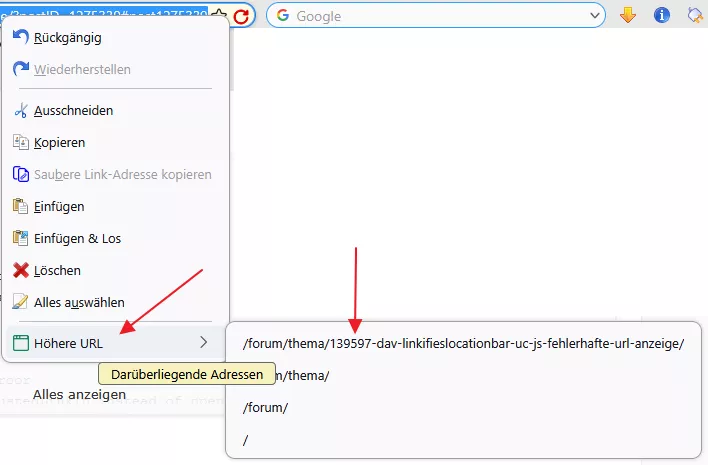
Funktioniert aber anders:
Rechtsklick in Adressleiste machen, im Kontextmenü gibt es unten
einen neuen Eintrag. In diesem wird die Adresse aufgeteilt in klick-bare
Einzeleinträge. Vielleicht kann es ja jemand gebrauchen.
Sieht dann so aus:
Mfg.
Endor
Hallo lenny2
Es könnte sein, dass ich was gefunden habe.
Du möchtest ja einen Eintrag der das automatische schließen
von Popups beinflusst, wenn ich es richtig verstanden habe.
Bitte teste mal diesen about:config Parameter:
ui.popup.disable_autohide
true oder false
Wenn das das richtige ist, füge ich es gerne ins Script ein.
Bitte gib mir Bescheid.
Mfg.
Endor
ein eigenes Skript erstellt werden
Hallo 2002Andreas.
Das habe ich schon befürchtet.
Dann kann ich leider nichts machen.
Ps.
Danke für das Verschieben der Beträge.
Klasse!!!
Mfg.
Endor
